Overview
The working folder is the central location where iPool Apollo stores all project information. Understanding its structure and importance is a prerequisite for every simulation you run.
- Required setup: a designated working directory that is accessible and correctly referenced in Defaults.csv
- What this page covers: why the working folder matters, its recommended structure, and best practices for maintaining it
- Exercise: navigate to your working folder and confirm all expected sub-folders are present
Working Folder
The working environment is the central location where iPool Apollo stores all project information. Think of it as the workspace for every simulation. Rather than storing everything inside the installation folder, iPool Apollo organizes simulation data into dedicated sub-folders. This organization makes projects easier to maintain and prevents accidental modification of application files.
Why is the Working Folder Important?
Every simulation depends on files stored within the working directory. These include:
- Databases — system, bid, flow, and scenario databases
- Demand data — historical and forecasted regional demand profiles
- Generation data — historical and forecasted capacity factor data
- Historical market files — RTD, RTDOE, RTDOR, and related WESM files
- Bid files — Historical, Typical, Custom, and Dynamic bid inputs
- Event files — constraints and scenario variations applied during simulation
- Reports — output from completed simulations
- Scenario files — saved simulation configurations
If directory paths in Defaults.csv are incorrect, iPool Apollo may be unable to locate these resources and simulations will fail.
Recommended Folder Structure
A typical working directory contains sub-folders organized by file type. Each folder has a dedicated responsibility and should not be renamed unless the corresponding directory settings in Defaults.csv are updated to match.
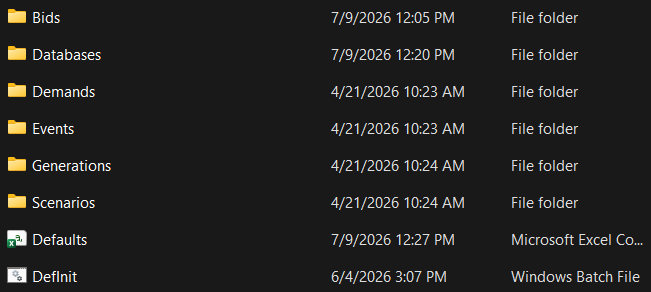
Best Practices
Follow these practices when setting up and maintaining your working folder:
- Store all project files inside the designated working directory. Do not scatter files across unrelated locations.
- Avoid moving folders after configuration. Once Defaults.csv references a path, changing the folder location requires updating the corresponding setting.
- Keep consistent naming conventions. Use clear, predictable names for project folders (for example,
WESM2606for a June 2026 project). - Back up databases regularly. The system and scenario databases represent significant accumulated work; loss of these files requires recreating simulations from scratch.
- Separate production scenarios from testing scenarios. Use distinct sub-folders or separate working directories to avoid overwriting live results with test runs.
Exercise
Give it a try and do this exercise:
Step 1 of 3
Locate your working directory